
Open source software for SMEs: the map of building blocks to take back control
Field: information systems, self-hosting, business continuity
For: SME owners who want to bring their tools in-house, and their IT person
Experience: the architecture I run every day for my own companies
A small or mid-sized business can run most of its IT on open source software for SMEs, on a server it controls: ERP, files, passwords, remote access, backups, monitoring and even AI. Here is the full map of building blocks, what each one gives you, and the order in which I put them in place.
Background
In August 2026, I left my online Odoo Enterprise subscription for Odoo Community on my own server. I described that migration in a dedicated article. But an ERP alone is not an IT system. Around it, I needed a secure front door, remote access, backups, monitoring and a way to rebuild everything if a machine fails. That whole picture is what I describe here: the map I draw with a business owner before touching anything.
The problem: renting every tool, forever
Most SMEs have stacked subscriptions over the years: a management system, a file-sharing space, a password manager, a VPN, a monitoring tool. Each one is reasonable on its own. Together, they raise three questions for a business owner:
- Cost: every price increase or plan change is imposed on you, with no negotiation.
- Risk: your data is spread across five or six vendors, with as many terms, access points and countries.
- Continuity: if a vendor changes its rules, closes a service or suspends your account, your business stops with it.
Open source does not make these questions go away. It gives you back the means to answer them: the software is yours, the data stays with you, and you can change provider without changing tools.
The map of building blocks
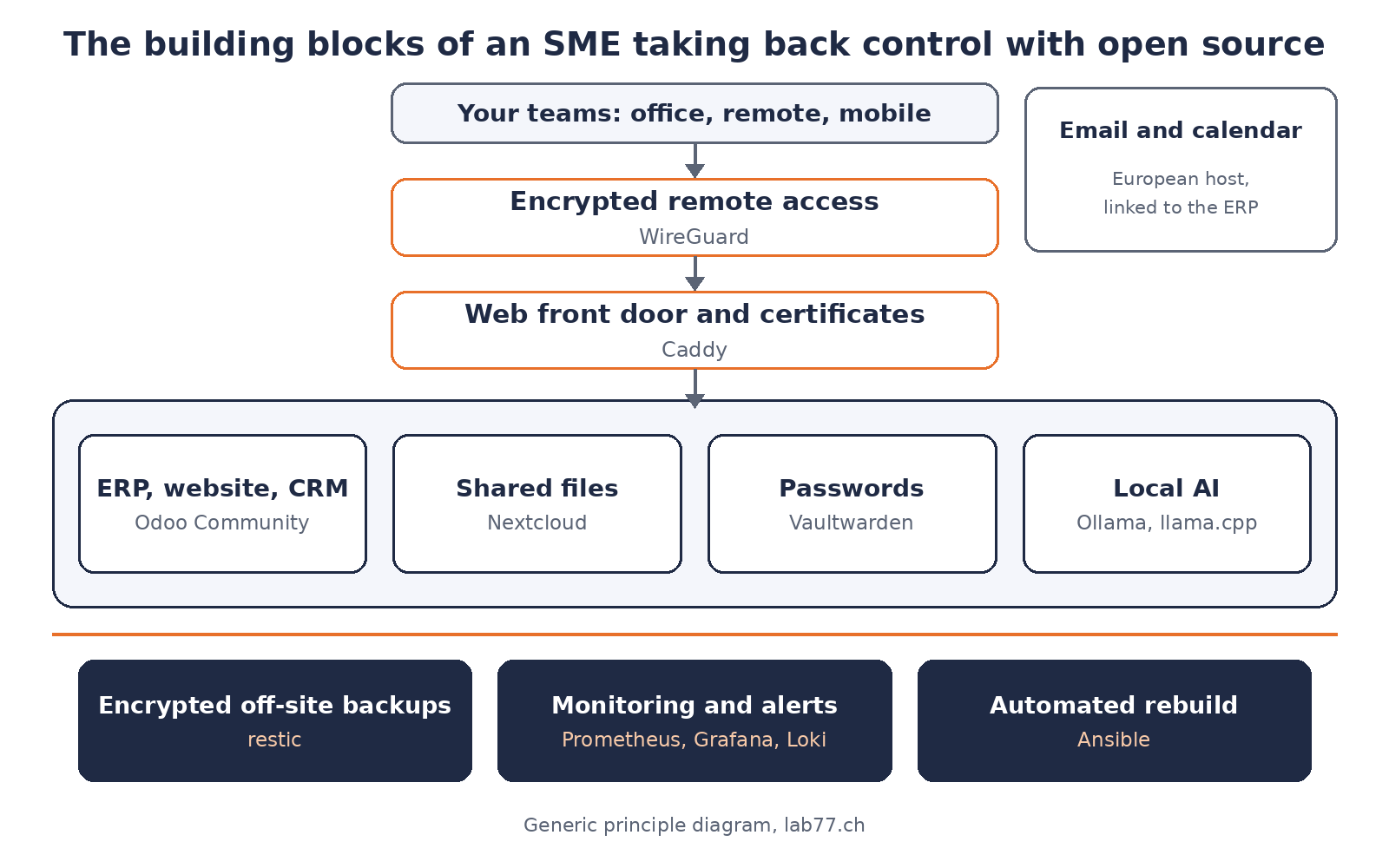
Principle diagram: your teams go through encrypted access and a single front door; applications live on your server; backups, monitoring and rebuild form the foundation.
1. The ERP: Odoo Community
This is the core: sales, invoices, accounting, CRM, website, appointments. The Community edition is free software, with no per-user licence. Combined with the modules of the OCA, the community that maintains hundreds of free modules, it covers most of what an SME needs. What you gain: a tool whose price does not change from one year to the next, and data you can connect to whatever you want.
2. Email and calendar: the block I do not advise you to host
I will be frank: hosting your own email is a job in itself. Deliverability, spam filtering and server reputation require constant attention. I recommend a serious Swiss or European email host, connected to the ERP so that emails and appointments land in the right place. That is what I did for my companies.
3. Files: Nextcloud
The equivalent of an online shared file space, with sync on computers and phones, link sharing and document versions. Your client files no longer pass through a service whose country and terms you do not control.
4. Passwords: Vaultwarden
A team password vault, compatible with the Bitwarden apps on computers and phones. Each colleague has a vault, shared access is centralised, and someone leaving is handled in a few clicks instead of changing twenty passwords in a hurry.
5. Remote access: WireGuard
A modern, lightweight, encrypted VPN. It is what makes your internal tools invisible from the internet: only authorised devices reach them, at the office or when working remotely. I explained in my article on company VPNs why the remote-access box has become a target: the fewer open doors, the better you sleep.
6. The web front door: Caddy
Whatever must be public (your website, your shop, a form) goes through a single door, a web server that handles encryption certificates automatically and renews them without intervention. One door also means one place to watch and harden.
7. Backups
Encrypted, daily, copied off the server, and above all tested. This is the block that saves the business on the day everything else has failed. I devote a full article to it: backups that actually restore.
8. Monitoring
Knowing that a site is down, a disk is filling up or a backup did not run, before your customers tell you. The details are in monitoring your servers without a subscription.
9. Local AI
AI models running on your own machine, to summarise, sort or search your documents without sending them to an American provider. It is not required at the start, but it is the block that is progressing fastest. I cover it on the self-hosted AI page.
And to tie it all together, a tenth, invisible block: the ability to rebuild a server in a few minutes, from a written recipe rather than from one person's memory.
Where to start
You do not switch everything over in a weekend. The order I follow:
- First the foundation: a hardened server, remote access, backups and monitoring. Nothing is migrated until we know how to restore.
- Then the simple blocks: passwords and files, which bring an immediate benefit to the whole team.
- Then the ERP: the longest project, to be prepared with an inventory of what you really use.
- Finally local AI: once the data is in order and you know what you want to entrust to it.
What you keep in-house
- Your data: customers, accounting, documents and passwords on a server you control, in the country of your choice.
- Your budget: no more per-user licences; the cost becomes that of the server and the operating time, which you can plan.
- Your freedom: if your provider no longer suits you, another one can take over the same documented tools.
- Your continuity: an outage is fixed by restoring and rebuilding, not by waiting for a vendor's support.
Under the hood (for your IT person)
- Containers: each application in its own Docker Compose stack, with an isolated network per stack. Versions are pinned: no automatic updates on the ERP; an update is prepared, backed up and verified.
- Minimal exposure: only the reverse proxy listens on the internet. Admin interfaces are reachable only through the VPN, and the firewall closes everything else.
- Database: a reliable ERP backup is a logical export of the database, verified by reading it back. Copying the engine's files while it runs does not give a usable backup, as the PostgreSQL documentation states plainly.
- Secrets: no plain-text passwords in versioned configuration files; encrypted secrets and a separate vault.
- Lesson learned: a poorly chosen restart policy left an ERP stopped after the container engine restarted. Since then, every restart rule is tested by actually triggering the failure.
What I take away
Taking back control with open source is not about software: it exists, it is mature and free. It is about operations. A server without tested backups, monitoring and a rebuild recipe is not independence, it is a displaced risk. With that foundation in place, however, an SME keeps its tools, its data and its freedom to choose.
Going further
I can draw this map with you, starting from your current tools, then install and run it. See Your tools and your data, or book a 20-minute call.
The step-by-step guides
If your IT person wants to build the foundation themselves, my guide no. 1, a secure server from A to Z (CHF 39), details every step: hardened access, VPN, firewall, Docker and certificates. The Guides Pack (CHF 149) then brings together guides 0 to 8: a complete stack, documented and tested in production, from a bare server to backups, secrets, an AI assistant's memory and monitoring.
Sources
- Odoo, source code repository (Community, LGPLv3 licence), Odoo S.A., accessed 15 November 2026.
- Nextcloud Server Administration Manual, Nextcloud GmbH, accessed 15 November 2026.
- Vaultwarden, a server compatible with Bitwarden clients, official repository, accessed 15 November 2026.
- WireGuard, official project website, accessed 15 November 2026.
- Caddy, Automatic HTTPS, official documentation, accessed 15 November 2026.
- PostgreSQL, File System Level Backup, official documentation, accessed 15 November 2026.
- Ollama, running AI models locally, official repository, accessed 15 November 2026.
- Photo: Jordan Harrison / Unsplash (unsplash.com/photos/40XgDxBfYXM), Unsplash licence. Diagram: Lab 77.
Tags: open source, SME, self-hosting, Odoo Community, Nextcloud, Vaultwarden, WireGuard, Caddy, data sovereignty