
claudeVPS — Claude Code on a server, with everything it lacks
Field: AI / Agents / System administration / Self-hosting
Period: 2026 - present
Client: Personal project — Lab 77 workshop infrastructure
Context
I work with AI agents every day: they run my ERP, my notes, my publishing, and even my servers' infrastructure. I wanted these agents to run permanently on a server, and to be able to talk to them from my phone, wherever I am.
Two tools existed, each with its limits:
- Claude Desktop is comfortable: interfaces for connectors, extensions and scheduled tasks. But it runs on a desktop computer, not on a headless server.
- OpenClaw, a third-party self-hosted agent gateway, gave me several agents, long-term memory, chat channels and automations. But it reuses the Claude subscription in a way Anthropic's terms restrict more and more strictly: a risk I no longer wanted to take.
That left Claude Code, Anthropic's official command-line tool. It is powerful, it runs on a server, and with Remote Control you can drive its sessions from the Claude app. But on a headless server it lacks almost all of Desktop's comfort.
Problem
Goal: stay 100% on Anthropic's official tools and within the subscription, with no third-party gateway and no home-made chat, while getting back what Desktop and OpenClaw provided.
Claude Code's gaps on a server:
- No interface to manage MCP servers, plugins, skills and agents: everything is done in files
- No real scheduled tasks: loops and reminders are tied to one session and expire
- Nothing survives a server reboot
- Remote Control needs a real terminal, which a background service does not have
- No overview of the sessions, no terminal reachable from a browser
- No memory shared between sessions and projects, no server monitoring
Solution
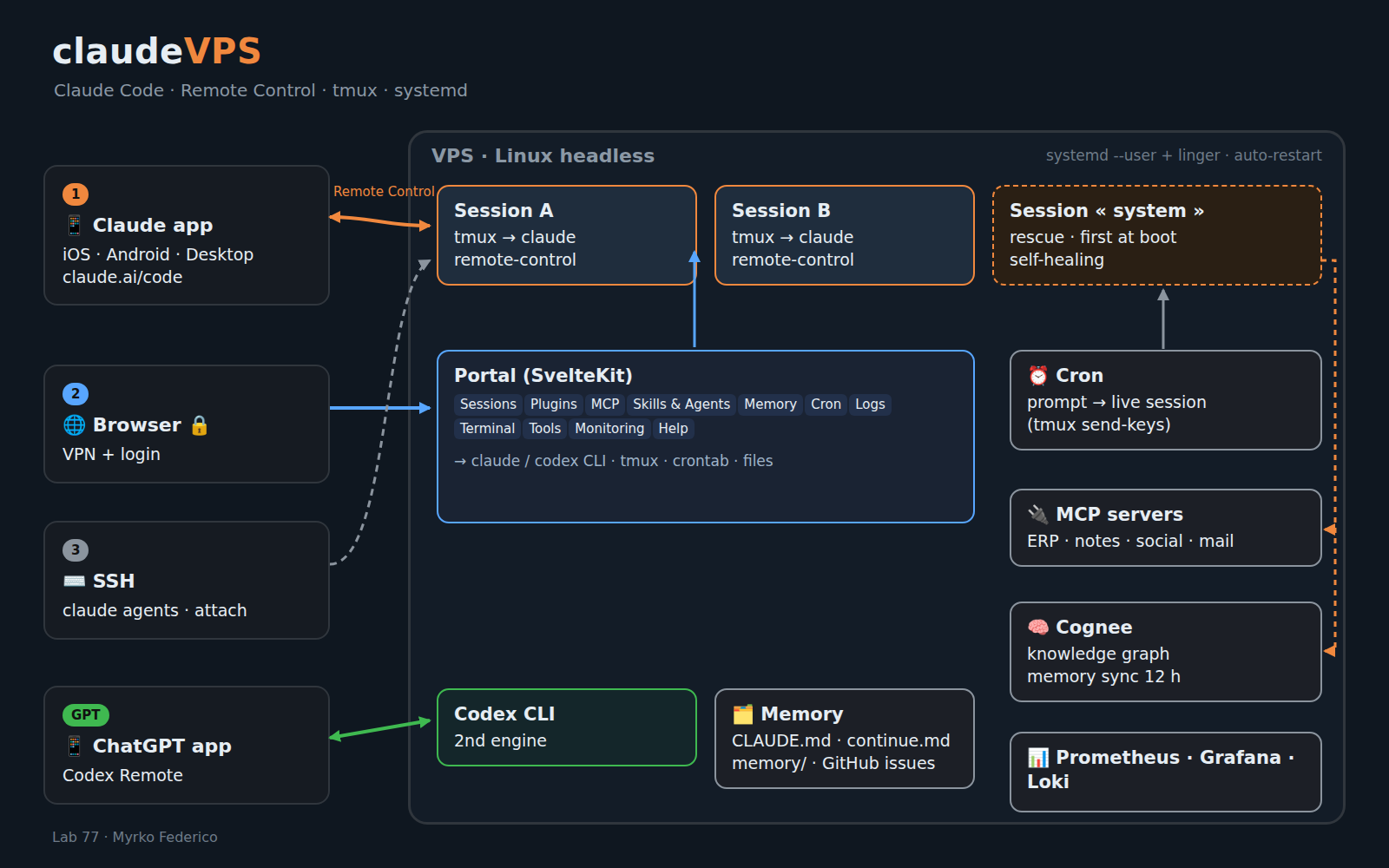
claudeVPS does not replace Claude Code: it adds the missing experience layer around it. The principle: three doors, each with its own role.
- Door 1 — the official Claude apps (mobile, desktop, web) to chat with the sessions, through Remote Control. No home-made chat, by design.
- Door 2 — a web administration portal, reachable only through a VPN, that drives the official tools and gives everything else an interface.
- Door 3 — the SSH terminal, for advanced administration.
What Claude Desktop had, and claudeVPS brings back to the server
| Need | Claude Code alone on a server | What claudeVPS adds |
|---|---|---|
| MCP servers | JSON files and commands | MCP tab: guided form or JSON, three families shown (local, account connectors, plugin-provided) |
| Plugins | No manager on a server | Plugins tab: official catalogue, installation, activation, bundled components |
| Skills and agents | Markdown files by hand | Skills & Agents tab: creation and editing, with the origin of each skill |
| Scheduled tasks | Loops tied to a session, which expire | Cron tab: the prompt is injected into a live session on the chosen schedule |
| Persistence | Everything stops on reboot | systemd user services, automatic restart, a rescue session at boot |
| Multiple sessions | No overview | Sessions tab: creation, health and activity, stop, direct link to the app |
| Terminal | SSH only | Web terminal in the browser, attached to the sessions |
| Memory | Per project, siloed | Sync to a Cognee knowledge graph, queryable by every session |
| Monitoring | None | Multi-server Monitoring tab, alerts, Docker updates approved by hand |
What OpenClaw provided, in a 100% official version
| OpenClaw | Equivalent in claudeVPS |
|---|---|
| Several specialised agents | Several Claude Code sessions and sub-agents, managed in the portal |
| Chat channels (Mattermost, Matrix, webchat) | The official Claude apps, through Remote Control |
| Long-term memory | Claude Code native memory + a synced Cognee graph |
| Periodic wake-ups (heartbeat) | Cron that injects a prompt into a live session |
| Automations (mail, searches) | Skills and local command-line tools, shared between engines |
| Agent on a GPT model | Codex CLI as a second engine, managed in the same portal and reachable from the ChatGPT app |
| Observability | Monitoring and Logs tabs |
Result: OpenClaw is no longer needed. The portal can neutralise it in one click, pending its removal.
How it works
- Each Claude Code session runs inside tmux, which gives it the terminal Remote Control needs to show up in the app.
- systemd user services restart everything at boot and watch the sessions, with a retry limit to avoid loops.
- A rescue « system » session starts first and depends on nothing else: it is the one that repairs the rest.
- The portal (SvelteKit) only calls the official
claudeandcodexcommands, tmux, crontab and the configuration files. It never runs a model on its own: AI only runs when you ask for it. - Memory has three layers: a context file per project, a crash-recovery snapshot and Claude Code's memories, all synced to Cognee. Work items are tracked in GitHub issues.
- Everything is trilingual (French, English, Spanish), MIT-licensed, with an install script: a friend has already deployed it on another host.
Technologies
- Claude Code (Remote Control, sub-agents, skills, plugins, MCP) and Codex CLI
- SvelteKit 5 portal, TypeScript, Node, xterm.js for the web terminal
- Linux, systemd, tmux, cron, WireGuard, Caddy, Docker
- Cognee (knowledge graph), Prometheus, Grafana, Loki
- Servers hosted in Switzerland with Infomaniak
Lessons learned
- “Sent” does not mean “received”. A messaging tool between sessions can return “success” while the message is lost. The only proof is on the recipient's side. For anything important: a dropped file.
- “Connected” does not mean “alive”. A session can show as connected while unable to work. The right indicator is whether its worker process exists.
- Every agent wake-up has a cost. A relay that called a model on each message was removed. Principle: no AI run triggered by the product itself.
- Native features do not always survive a reboot. For “always on”, you need your own layer of services and restarts.
- The safety net must not depend on anything it is meant to repair.
- Duplicating a configuration makes it drift. Per-project copies kept a cancelled service alive for weeks. A single source of truth.
- A metric beats a message. Two wrong conclusions in one evening, for not looking at the graph. And an outdated incident note is worse than no note.
- A missing value shows as “—”, never 0: a fake zero reads like a measurement.
Result
Deliverable:
- Claude Code sessions always available on a server, driven from the Claude app on phone or computer
- A 12-tab administration portal, in daily use
- Two engines, Claude Code and Codex, in the same interface
- The third-party OpenClaw gateway replaced by official building blocks
This project demonstrates:
- The ability to fill a tool's gaps without working around it: everything goes through the official commands
- A sovereign, resilient architecture: self-hosted, persistent, self-healing
- Daily practice of working with AI agents, and rules drawn from real incidents
The Claude Code features claudeVPS relies on, such as Remote Control, are recent and may change.
Tags: lab, Claude Code, AI agents, Remote Control, self-hosting, VPS, MCP, OpenClaw, Codex, SvelteKit